Views and Spaces#
Let’s say we have a simple problem: we want to run a vector add and we want to run it on the GPU. We may start with a code that looks like this:
double* x = new double[N]; // also y
parallel_for("DAXPY", N, [=] (const int64_t i) {
  y[i] = a * x[i] + y[i];
});
The problem is that x and y reside in CPU host memory. We need a way of storing data (multidimensional arrays) which can be communicated to an accelerator (GPU). The Kokkos answer to this problem is Views
The Kokkos::View abstraction is a reasonably lightweight C++ class. It contains a pointer to some data, and some metadata like how long the array is. The view is templated on the data type, as well as on other things we will talk about later.
A high-level example of using a View for DAXPY would be:
View<double*, ...> x(...), y(...);
/* populate x, y */
parallel_for("DAXPY", N, [=] (const int64_t i) {
  y(i) = a * x(i) + y(i);
});- Views are like pointers, so they are copied by value in your functors.
- Views are multi-dimensional arrays (can have up to 8 dimensions)
- The number of dimensions (rank) is fixed at compile time
- Arrays are rectangular, not ragged, meaning each row/column has the same length
- The sizes of the dimensions can be set at compile time or at runtime
- Access elements via the “
()” operator
// Note: runtime-sized dimensions must come first
View<double***> data("label", N0, N1, N2); // 3 runtime, 0 compile
View<double**[N2]> data("label", N0, N1); // 2 runtime, 1 compile
View<double*[N1][N2]> data("label", N0); // 1 runtime, 2 compile
View<double[N0][N1][N2]> data("label"); // 0 runtime, 3 compile

//Access
data(i, j, k) = 5.3;
The benefit of compile-time dimensions is that it allows the internal indexing to be better optimized. At compile time, the compiler can compute the offset to the data pointer and get rid of some arithmetic when indexing.
View lifecycle#
- Allocations only happen when explicitly specified. That is, there are no hidden allocations. They happen when you call a constructor on a view that takes a label (there are other constructors that allow you to hand a pointer to the data you want to use).
- The copy construction and assignment are shallow (like pointers), so you pass views by value, not by reference.
- Reference counting is used for automatic deallocation. That is why we added scoping braces in the previous example. If we call
Kokkos::finalize()before all views go out of scope, the Kokkos runtime will complain about leaking memory, and we don’t want that. - Views largely behave like
shared_ptrbecause of these properties
Example:
View<double*[5]> a("a", N), b("b", K);
a = b;
View<double**> c(b);
a(0, 2) = 1;
b(0, 2) = 2;
c(0, 2) = 3;
print_value( a(0, 2) );
Thinking about this like shared pointers, the answer is “3.0”. In the first line, we have two allocations. In line 2, we assign b to a, which means the reference count to the original allocation for a goes to zero, and it gets de-allocated. There is only one allocation of length K with two references. If you were to ask a what its label is, the answer is "b" because the label is associated with the allocation.
Then we copy construct b into c, letting us convert run-time and compile-time dimensions. Now c also points to that same allocation. So we are overwriting the same element with each assignment, and we end up with 3 at the end.
View Properties#
- Sometimes we need to ask a View about its properties. Accessing a View’s sizes is done via its
extent(dim)function. There is alsostatic_extent(dim)to access extents of compile-time dimensions. - You can retrieve a raw pointer via its
data()function - The label can be retrieved via
label()
There are some advanced features of views that we will talk about later:
- Memory space in which the view’s data resides
deep_copythe view’s data- Layout of multidimensional array
- Memory traits
- Subview: generating a view that is a “slice” of another multidimensional array view
Execution Spaces#
Now we come to how we think about heterogeneous nodes and how we reason about them using space abstractions. We want to control where parallel bodies are run (execution space). We want to control where the view data resides (memory space).
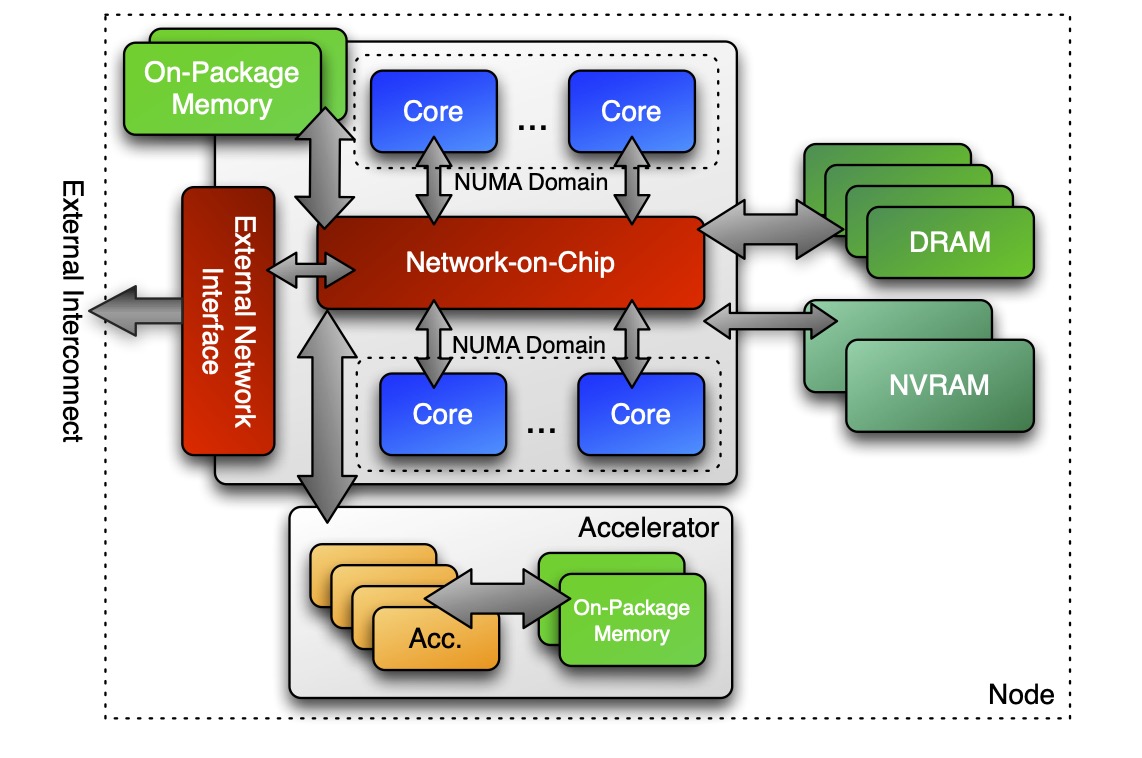
In the Kokkos lingo, execution space is a homogeneous set of cores and an execution mechanism (i.e. a “place to run code”). If we have this architecture we talked about earlier, then an execution space might be the CPU cores for executing code on the CPU. Another space might represent executing code on the accelerator. There is a variety of execution spaces currently supported by Kokkos: Serial, Threads, OpenMP, CUDA, HIP, and SYCL.
(IMAGE: p17)
If we look back at the code, there are two different things: there is code that we run inside of the loop body that is “parallel code” and there is everything else outside of the parallel construct which is “host code”. Host code will always be run in the host process. Short of doing something weird and fancy, this is in the thread that starts running main() on the CPU. The parallel code will be run in one of Kokkos’s execution spaces. If not specified, it runs in the default execution space. We can control where the body is executed by changing the default execution space (at compile-time), or by specifying an execution space in the policy.
Before, we have just provided an integer as the range policy, which implicitly translates to a particular default RangePolicy:
// Default
parallel_for("Label",
  numberOfIntervals, // => RangePolicy<>(0, numberOfIntervals)
  [=] (const int64_t i) {
    /* body  */
  });

// Custom
parallel_for("Label",
  RangePolicy<ExecutionSpace>(0, numberOfIntervals),
  [=] (const int64_t i) {
    /* body  */
  });
One of the template arguments for the policy is an execution space. The main reason you can not specify the policy at runtime is because you would then need to compile every body for every execution space, and that blows up your executable and compile time. You can use the typical ways of converting compile time decisions to run time decisions, but you have to do that yourself.
In order to use a particular execution space as an argument, you must:
- Kokkos must be compiled with that execution space enabled
- The execution spaces must be initialized (and finalized). Things like scratch space for accumulators and thread pools are implicitly created and need to be managed with the initialization/finalization calls.
- Functions must be marked with a macro for non-CPU spaces
- Lambdas must be marked with a macro for non-CPU spaces
These portability annotation macros are needed because they tell the compiler that a function should be compiled for both the CPU and the GPU. Otherwise the compiler would need to try to compile everything for everything, and then throw functions away if it hits instructions it can not use. That would be very inefficient, and also expose a lot of foot-guns for intrinsics. The annotation macros tell the compiler where functions should be compiled for.
struct ParallelFunctor {
  KOKKOS_INLINE_FUNCTION
  double helperFunction(const int64_t s) const { ... }
  KOKKOS_INLINE_FUNCTION
  void operator()(const int64_t index) const {
    helperFunction(index);
  }
}
// where Kokkos defines
#define KOKKOS_INLINE_FUNCTION inline                     /* if CPU-only */
#define KOKKOS_INLINE_FUNCTION inline __device__ __host__ /* if CPU+CUDA */Kokkos::parallel_for("Label", numberOfIterations,
KOKKOS_LAMBDA (const int64_t index) { ... });
// where Kokkos defines
#define KOKKOS_LAMBDA [=] /* if CPU-only */
#define KOKKOS_LAMBDA [=] __device__ __host__ /* if CPU+CUDA */Memory Spaces#
Execution spaces are only half of the story. We also need correct data management so that our views are allocated in memory that the relevant execution space can access. Otherwise we segfault and cry. As a motivating example, consider:
View<double*>data("data", size);
for (int64_t i = 0; i < size; ++i) {
  data(i) = ...read from file...
}

double sum = 0;
Kokkos::parallel_reduce("Label",
  RangePolicy<SomeExampleExecutionSpace>(0, size),
  KOKKOS_LAMBDA (const int64_t index, double& valueToUpdate) {
    valueToUpdate += data(index);
  }, sum);
Where is data stored? GPU memory? CPU memory? Both? And what does that mean for the initialization loop? The answer to that depends on memory spaces.
Memory spaces are explicitly-manageable memory resources. You can think of them equivalently to allocator types. In our hypothetical node, there are many places we could store data, like on-package CPU memory, DRAM, GPU memory, etc. All of those would be exposed inside of Kokkos as memory spaces.
Every View stores its data in a memory space which is set at compile time. You can explicitly specify it as a template argument for the View: View<double***, MemorySpace> data(...);
There are multiple available memory spaces: HostSpace, CudaSpace, CudaUVMSpace, etc. These spaces act very differently.
Each execution space has a default memory space associated with it, which is used if the space provided is actually an execution space. You can create a view and give it any space, not just a memory space, and that will work.
If not space is provided, then the view’s data resides in the default memory space of the default execution space. The reason for this is that if you allocate views and only access them inside of parallel constructs, only using integers to specify execution spaces, then you can write a code that does not modify execution or memory spaces at all and it will just work.
//Equivalent:
View<double*> a("A", N);
View<double*, DefaultExecutionSpace::memory_space> b("B", N);